

Video Conferencing Brisbane
Looking for ways to streamline video conferencing and conference calls in your office? Get connected with Central Technologies to guide you through.
Book a Free Consultation
Crystal Clear Communication
With technology booming and developments being made left, right and centre, there have been some undeniable changes to the way in which we communicate. Thousands of companies worldwide have made the swift switch from face-to-face board meetings to working from home video calls- and for a good reason.
Nowadays, professionals on opposite ends of the world are only one click away from being brought together, all thanks to video conferencing systems.
Although the benefits are endless- it’s vital that all parties of the video meeting are given and can receive crystal clear communication.
To ensure efficient and effective communication amongst team members or clients of your Brisbane company, you must receive the best video conferencing software possible.
For the latest advice and video conferencing systems solutions, contact one of the dedicated specialists at Central Technologies.
Video Conferencing Solutions
To avoid miscommunications and ensure crystalline conference calls across the board- you’ll need to have reliable, high-quality video conferencing solutions in place.
Some of the benefits your corporation, clients and colleagues can experience with Video Conferencing Solutions:
- Streamlined communication
- Freedom for employees to work from home
- Eliminate commuting times and reduce transportation fees
- Ease of which you can build and maintain client relationships
All can be made possible with Logitech and MAXHUB video conferencing solutions, specifically curated for the modern workplace.
With top-quality HD video, crystal clear audio, seamless content sharing and intelligent integration across multiple devices, your team will never miss a beat.
For the latest advice and video conferencing systems, contact one of the dedicated specialists at Central Technologies.
Logitech Video Conferencing Systems

Renowned for their innovation and quality, Logitech technologies are made to make the modern work-life manageable. Offering state of the art HD conference cameras and conference room solutions, Logitech brings people closer together and brings you closer to your business goals.
Logitech Conference Cameras
The future is now– and it’s all within your grasp.
Central Technologies, Brisbane provides a range of Logitech Conference Cameras to set up your video conference for success. Take a peek at the possibilities:

Rally Camera
Wherever you go, the Logitech Rally Camera follows. Featuring automatic camera control, you’re always in frame! This premium PTZ camera features studio-quality video, sleek industrial design, privacy assurance and much more. Ready to plug-and-play, this is a perfect all-rounder video conferencing solution.
View Rally Camera on Logitech
MeetUp
The MeetUp Logitech Conference Camera – made for small spaces, designed for big ideas. This little one packs a big punch, featuring an Ultra HD Camera, Motorized pan/tilt lens and full-range speaker systems. This is every teams’ best friend when it comes to urgent video conferences or daily team meetings.
View MeetUp on Logitech
PTZ Pro 2
Video conferencing that echo’s the human connection. The Logitech PTZ Pro 2 is built for sizeable classrooms, large board rooms, auditoriums and lecture halls. Be heard, seen and understood from the back row as the PTZ PRO 2 allows you to keep all listeners engaged with its’ supreme audio and visual capabilities.
View PTZ Pro 2 on Logitech
Group
Bring the team closer together with Logitech Group- the video conferencing camera perfect for mid to large-sized meeting rooms. Features include plug-and-play simplicity, versatile mount options, supreme HD video and a full-duplex speakerphone for crisp audio.
View Group on Logitech
Connect
Become best pals with this portable Bluetooth® conference cam and speakerphone. Whether you’re on the go or in the office, you’ll stay connected with Logitech Connect. Features include 4x zoom, HD video, 90° field of view and crisp speakerphone capabilities.
View Connect on Logitech
BCC950
Keep private matters private with Logitech BCC950, built for one-on-one calls or small team video conferences. Featuring speedy setup capabilities, petite sizing, high-quality video and crystal-clear audio, the BCC950 Is perfect for small teams of 1-4.
View BCC950 on LogitechLogitech Conference Room Solutions
Logitech Conference Room Solutions simplifies video conferencing all-round. With various equipment available, video conference calls will be set up and ready to go in no time, maintaining strong connections, no matter what distance comes between you. Central Technologies, Brisbane provides:
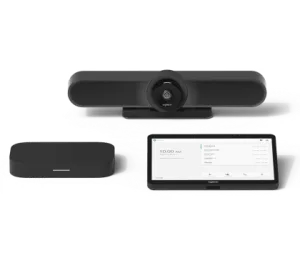
Google Rooms
Turn any space into a fully-fledged meeting place, tailor-made for meeting rooms small, medium or large, depending on your specific requirements. All systems include a Logitech video conferencing camera, cable-retained mounts and a Logitech Tap touch device.
View Google Rooms on Logitech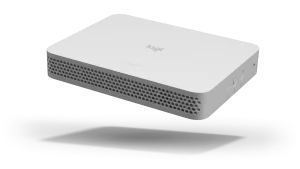
Logitech RoomMate
Logitech RoomMate brings a whole new meaning to compatibility. Connected with Zoom Rooms, Microsoft Teams and other video conferencing platforms, the Logitech RoomMate computing appliance provides all the power necessary for your next video conference. Play matchmaker and set the RoomMate up with your chosen Logitech Conference Camera.
View Logitech RoomMate on Logitech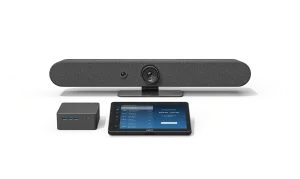
Room Solutions for Zoom Rooms
Ready, set, go! Logitech Room Solutions for Zoom Rooms include everything you need for small, medium or large spaces. Including a mini PC, Logitech Video Conferencing Camera, mounts and tap controller, all users can tap into scheduled Zoom meetings at ease.
View Room Solutions for Zoom Rooms on Logitech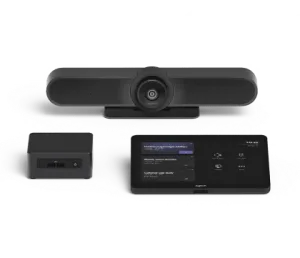
Room Solutions for Microsoft Teams
Ready, set, go! Logitech Room Solutions for Microsoft Teams includes everything you need for small, medium or large spaces. Including a mini PC, Logitech Video Conferencing Camera, mounts and tap controller, all users can tap into scheduled Microsoft Teams meetings at ease.
View Room Solutions for Microsoft Teams on Logitech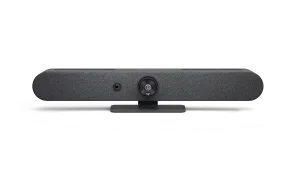
Rally Bar Mini
The Rally Bar Mini is Logitech’s Premium Video Conferencing bar, designed with small rooms in mind. Known for its’ simple upset up, Rally Bar Mini features USB connectivity with no software required. With versatile mounting options, the Rally Bar Mini can be set up anywhere you please.
View Rally Bar Mini on Logitech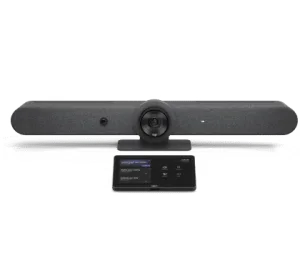
Logitech for Microsoft Teams Rooms on Android
Cables, connections and complicated components no more! With no PC required and fewer cable connections, the Microsoft Team Rooms is set up exclusively with android. Logitech Room Solutions for Microsoft Teams Rooms on Android includes Logitech Video Conferencing Camera, mounts and tap controller.
View Logitech for Microsoft Teams Rooms on Android on Logitech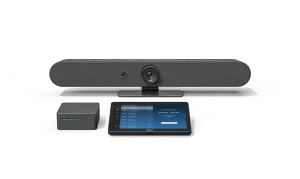
Logitech for Zoom Rooms Appliances
Making Zoom setup simple. With pre-configured Zoom support, you can jump into Zoom Rooms with ease without having to use a PC or Mac.
View Logitech for Zoom Rooms Appliances on Logitech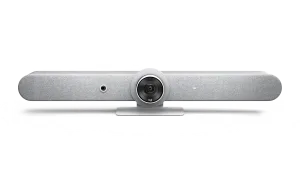
Rally Bar
The Rally Bar is Logitech’s Premium Video Conferencing bar, designed with mid-sized rooms in mind. Known for the simplistic setup, Rally Bar features USB connectivity, versatile mounting options and no additional software required.
View Rally Bar on Logitech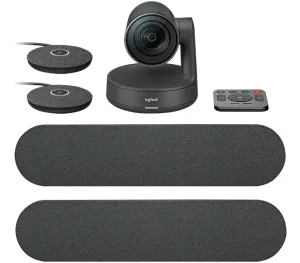
Rally Plus
The Rally Plus is Logitech’s Premium Video Conferencing system, designed with large rooms in mind. Known for the simplistic setup, Rally Plus features a USB mode, appliance mode and clean cabling.
View Rally Plus on LogitechFor more information on our range of Logitech Video Conferencing Systems, Conference Room Solutions, and Cameras
Contact one of the dedicated specialists at Central Technologies, your local business partner on the Gold Coast, Brisbane, The Sunshine Coast Toowoomba for more information.
MAXHUB Video Conferencing Solutions

MAXHUB Video Conferencing Solutions bring you closer to the future of technology than ever before. MAXHUB is renowned for its state-of-the-art innovative technologies and applications, with conferencing solutions that meet the demands of today’s working world.
MAXHUB Conference Bar
The MAXHUB Conference Bar makes collaboration effortless across all conference calls and meetings. Central Technologies, Brisbane provides:
MAXHUB UC S15
An all-in-one video bar with its own built-in system, sized for huddle rooms and small meeting spaces. A 4K camera with a 120° field of view covers the whole room. Supports wired and wireless BYOD, plus wireless screen sharing.
View MAXHUB UC S15 on MaxHub
MAXHUB UC S07
An all-in-one 4K USB video bar for rooms of two to eight people. Camera, microphone and speaker in one unit, with an 8 metre voice pick-up range. Plug-and-play BYOD, backed by a three-year hot-swap warranty.
View MAXHUB UC S07 on MaxHubMAXHUB PTZ Camera
Get up close and personal with the MAXHUB PTZ Cameras. Video conferencing is made to feel like the real deal with ultra-clear visuals. Central Technologies, Brisbane provides:
MAXHUB UC P30
A 4K dual-camera system built for medium and large meeting rooms. Sony 8MP sensors, 12x optical zoom and a 90° field of view keep everyone in frame, and AI auto-framing follows whoever is speaking. Connects over USB, IP or HDMI.
MAXHUB Bluetooth Speaker Phone
Time to ditch the static. Eliminate white noise and allow your meetings to go on uninterrupted with the MAXHUB Bluetooth Speaker Phones. Central Technologies, Brisbane provides:
MAXHUB UC BM35
A portable Bluetooth speakerphone for small and mid-sized meeting rooms. Tuned to keep voices clear, and good enough for music and video playback too.
View MAXHUB UC BM35 on MaxHub
MAXHUB UC BM45
A speakerphone for rooms of any size. An 8-beam microphone array gives 360° voice pick-up, AI noise suppression cuts background distraction, and full-duplex audio means nobody gets clipped when two people talk at once. Daisy-chain several units for larger rooms.
View MAXHUB UC BM45 on MaxHubFor more information about MAXHUB Video Conferencing Solutions
Personal Solutions & Webcams
Sit up, smile and say hello to your best self with premium personal solutions and HD webcams.
Logitech Webcams
Capture yourself in your best light during all your digital meetings with Logitech Webcams. Central Technologies, Brisbane provides:
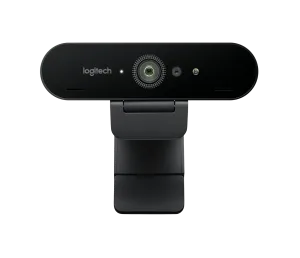
Brio Ultra HD PRO Business Webcam
The Brio Ultra HD Pro Business Webcam offers 4K Video, clear colour and crisp detail. With auto-focus, 5x zoom, Windows and Hello support, you’ll never hit another glitch in the road.
View Brio Ultra HD PRO Business Webcam on Logitech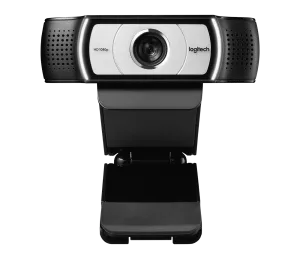
C930e Business Webcam
Features include advanced HD 1080p/30 fps resolution, auto-focus, wide 90° field of view, 4x zoom and omnidirectional mics. Made to let you be heard, seen and understood in unmatched quality, you’re set to impress in all your video conference meetings.
View C930e Business Webcam on Logitech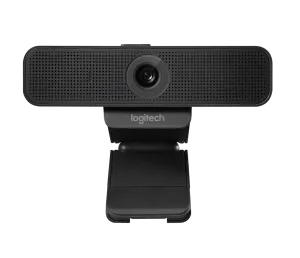
C925e Business Webcam
The Logitech C925e features enhanced HD 1080p/30 fps resolution, auto-focus, fixed 78° field of view, 1.2x zoom and omnidirectional mics. Made to let you be heard, seen and understood in pristine quality, you’re set to impress in all your video conference meetings.
View C925e Business Webcam on Logitech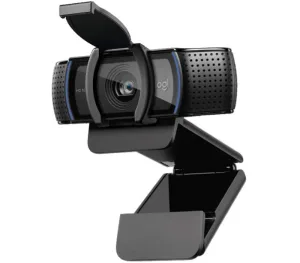
C920e Business Webcam
Work from anywhere and look good while you do it. With HD1080p, manual-activated mics, fixed 78° field of view and 1x zoom, you’ll be heard, seen and understood in perfect quality- set to impress in all your video conference meetings.
View C920e Business Webcam on Logitech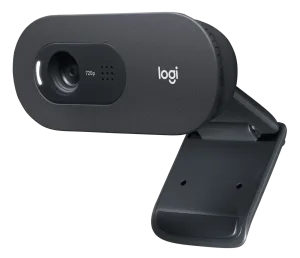
C505e HD Business Webcam
The Logitech C505e HD Business Webcam features an HD webcam with 720p, fixed 60° field of view and built-in long-range mic. Made to let you be heard, seen and understood in great quality, you’re set to impress in all your video conference meetings.
View C505e HD Business Webcam on LogitechMAXHUB Webcams
Mini but mighty, the MAXHUB Webcams come loaded with capabilities. Central Technologies, Brisbane provides:
MAXHUB UC W31
A compact USB webcam for desks and huddle rooms. 4K at 30fps with 5x zoom and auto-framing, certified for Microsoft Teams. Plug-and-play over USB, and it mounts to a wall or the top of a screen.
For more information about Personal Solutions and Webcams
Find out more about our Video Conference Solutions
If you have any more questions, contact one of the dedicated specialists at Central Technologies, your local business partner on the Gold Coast, Brisbane, Sunshine Coast and Toowoomba for more information.
Frequently Asked Questions
What is the easiest video conferencing?
The ‘easiest’ form of video conferencing may vary depending on your team. However, generally speaking, software-only video conferencing is typically the simple solution. Keep in mind that easy does not guarantee smooth sailing, as interruptions are more common in software-only video conferences.
What is video conferencing?
Video conferencing refers to the act of holding staff meetings, board meetings and so on via an online platform as opposed to face-to-face contact.
How can you adapt your meeting rooms for video conferencing?
Adapting your meeting rooms to be video-conference-ready is simple with Central Technologies ’ Video Conferencing Systems. We offer products from Logitech and Maxhub and can provide your team, large or small, with the best-suited products and packages to get your rooms conference ready.
What is video conferencing etiquette?
Every business, team or corporation may have different views of what is considered video conferencing etiquette. However, as a standard, it’s usually to mute yourself when you’re not talking, arrive to the video conference on time, make sure you’ve tested your equipment beforehand and fully engage with other members.
What are the different types of video conferencing solutions?
There can be strictly desktop-only applications with no add-ons (although not recommended if you want to hold meetings without error), meeting room systems (with video conferencing equipment- highly recommended), mobile-based conference rooms or software only meeting rooms.
Enquiries
Contact a business sales expert. Please provide your contact details and our sales team will get back to you.
Technical Support
We will answer your product specific questions such as product usage of your devices, or symptom resolution, etc.
Talk to us about your video conferencing brisbane
Tell us how your team works and we will recommend a system that fits.